



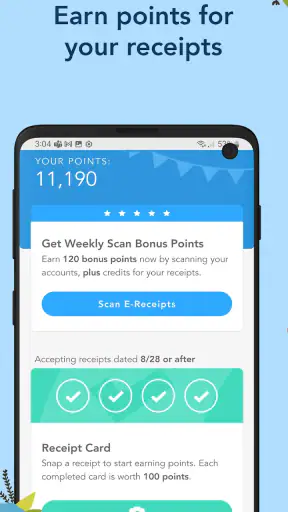

I like receipt-reward apps when they solve a small problem without pretending to be a full shopping assistant. Receipt Pal: Scan for Rewards takes that straightforward route: you photograph receipts, build a record of purchases, and work toward gift-card rewards. I found the idea easy to understand, but the real question is whether the routine feels worthwhile after the novelty of the first few scans disappears.
This is a free shopping app from The NPD Group, Inc., aimed at people who already keep receipts and would rather turn that habit into something useful. It is available to an Everyone-rated audience, and its presence on Android is substantial, with over a million installs and an average rating of 3.9 from around forty-two thousand ratings. Those figures suggest a familiar, established service, but they do not remove the need to think carefully about what you are comfortable sharing when you scan purchase documents.
What using Receipt Pal feels like in everyday life
The basic workflow is refreshingly simple. After buying something, I can keep the receipt instead of letting it disappear into a wallet or shopping bag, open the app, and use the scanner. The appeal is not that one receipt changes anything immediately; it is that several ordinary purchases can gradually contribute toward a reward. That makes the app better suited to steady use than occasional, frantic scanning.
A realistic example is a weekly grocery trip. I would take the receipt out before putting the groceries away, scan it while the details are still easy to read, and then store or recycle the paper. The habit takes less effort when attached to an existing routine. Waiting until the end of the month is less reliable because receipts fade, get lost, or become mixed together.
The app’s shopping focus also makes it different from a coupon-first service. I do not approach it expecting a list of discounts or a way to compare prices before purchasing. Its value comes after the transaction, through receipt collection and rewards. If your main goal is to spend less at checkout, a coupon or price-comparison app is usually the more direct option. If you already make regular purchases and want a small return from documenting them, this format makes more sense.
One useful mental adjustment is to treat the scanner as a record-keeping routine rather than a money-making shortcut. That keeps expectations realistic. The reward process is likely to feel satisfying only when scanning is quick and consistent, not when every receipt becomes a reason to check the app repeatedly.
Why the receipt itself deserves attention
Receipts are not just proof of purchase. They can contain store names, locations, timestamps, item descriptions, totals, payment details, and other clues about a person’s habits. Even when a scanner is convenient, I would avoid photographing unrelated papers or leaving a receipt visible in a shared camera roll. A clean image helps recognition, while a tidy phone also reduces accidental exposure.
I found it sensible to scan soon after shopping, but not while standing in a crowded checkout area. Taking a moment at home gives me better lighting, a flatter receipt, and more control over what appears in the image. This is a small practical choice, yet it improves both usability and privacy awareness.
Another non-obvious trade-off is deciding which purchases are worth the effort. If a receipt is crumpled, extremely long, or difficult to read, correcting a failed scan may take longer than the eventual benefit justifies. For regular users, choosing clear, ordinary receipts first can make the routine feel smoother. The app works best when it becomes a low-friction habit, not a second job.
Trust starts with visible choices
For me, trust in a receipt scanner is less about a polished interface and more about the choices presented during setup and use. I pay attention to what the app asks me to do, which screens explain those requests, and whether I can make a deliberate decision instead of tapping through a sequence automatically. A reward is not valuable if I feel rushed into sharing more than I intended.
I also prefer reviewing the phone’s permission controls before scanning regularly. Android lets me inspect and adjust access through system settings, so I would check the permissions shown for the installed version and keep only what is necessary for the way I use the app. I would not assume that an app needs broad access simply because it can scan images. The safest approach is to read each prompt and decline anything that does not fit my routine.
That is especially important when an app handles shopping documents. I would look for clear account controls, sign-out options, and any available way to manage stored information from inside the service. I would also keep my account details current enough to receive rewards without creating confusion, while avoiding unnecessary personal information in profile fields.
The current version is 11.2, and the app requires Android 7.0 or later. That makes checking compatibility worthwhile before installing on an older device. A person using an older phone should also consider whether the camera produces readable images and whether the operating system still provides comfortable permission controls. A technically supported device can still deliver a frustrating scanning experience if the camera or screen is poor.
Where privacy-sensitive moments appear
The most sensitive moment is obvious: capturing the receipt. I would inspect the edges of the paper before taking the picture, especially if it includes a name, membership identifier, partial payment information, or a store-specific account number. I would not scan a receipt belonging to another person without their permission, and I would avoid using the app for documents that contain information unrelated to shopping rewards.
The second sensitive moment is account setup. Any reward service needs enough information to associate activity with a user, but I still want to understand each requested field before submitting it. If a screen asks for details that do not seem connected to scanning or receiving rewards, I would pause rather than provide them automatically. This is not a criticism of Receipt Pal specifically; it is a sensible boundary for any app built around purchase records.
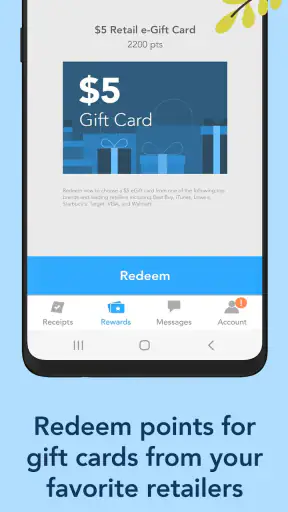
The third moment comes when a reward becomes available. Gift cards can make users focus on the payoff and skip the surrounding instructions. I would read the redemption screen carefully, confirm the destination, and avoid sharing a code in a message or screenshot that could be forwarded accidentally. Keeping reward information private is part of using the service responsibly.
I also recommend separating the app’s purpose from broader shopping behavior. Receipt Pal is not a replacement for a budgeting tool, and I would not assume that scanning creates a complete financial record. Receipts can be incomplete, purchases can be split, and cash transactions may not tell the whole story. For budgeting, I would use a dedicated finance method and treat this app as a reward-focused companion.
How much control does the user really have?
User agency shows up in small decisions: whether to scan a receipt, whether to grant a permission, whether to continue using an account, and whether a reward is worth the effort. I like services more when those decisions remain visible. With this app, I would make a personal rule to scan only purchases I am comfortable documenting and to review the app’s settings whenever an update changes the interface.
I would also avoid turning every household receipt into personal activity by default. In a shared home, it is better to agree on who owns the account and which receipts belong in it. That prevents duplicate submissions and avoids confusion when several people shop for the same household. It is a simple workflow improvement that the short store description does not explain, but it matters once more than one person is involved.
For people who shop infrequently, the decision is more nuanced. The app may still be useful if the occasional receipt is easy to scan, but rewards will naturally feel slower than they do for someone with frequent purchases. I would not install it expecting immediate value. I would try it for a short period, notice how much effort each scan requires, and then decide whether the routine fits my life.
People who dislike creating accounts around shopping activity may reasonably skip it. The free price removes a financial barrier, but free does not mean costless: time, attention, phone storage, and personal information all have value. Someone who wants maximum control over purchase records may prefer keeping receipts offline or using a local budgeting tool instead.
Strengths that become clearer with regular use
The strongest part of the concept is its low learning curve. I do not need to understand complicated shopping categories before trying it. The purpose is clear, and the scanner gives the app a practical action rather than turning it into another feed to browse. That simplicity is useful for people who want rewards without spending time hunting through offers.
Another strength is the way it can encourage better receipt discipline. I am less likely to lose a receipt when I have a reason to handle it immediately. That can help with returns or personal records, even though I would not rely on the app as the only place to keep proof of purchase. A retailer may require the original paper or a particular form of receipt, so I would preserve important documents separately.
The reward concept also works well for a modest, predictable goal. I would be more comfortable using accumulated value for a small planned purchase than treating it as income. That mindset avoids disappointment and makes the app’s gradual pace easier to accept.
Its established user base is reassuring in a limited sense: the app is not an obscure experiment with no visible history. Still, popularity should not replace reading prompts or reviewing controls. A large install count tells me that many people have tried it; it does not tell me that every user has the same privacy expectations or shopping pattern.
Friction I would want new users to expect
Scanning is only convenient when the receipt is readable. Thermal paper can fade, folds can hide text, and long receipts may require more careful positioning. I would not blame the app for every failed capture, but I would count these moments as part of the real cost of using it. A person who receives mostly digital receipts should consider whether the app fits that purchasing style before building a routine around it.
There is also a motivational limit. The first few scans feel rewarding because the process is new; later, the benefit depends on consistency. If the app takes several attempts for ordinary receipts, I would probably stop using it. This is why I prefer scanning at a fixed point in my shopping routine and abandoning a problematic receipt rather than spending excessive time trying to make one image work.
Another limitation is that rewards can influence behavior in unhelpful ways. I would never buy something merely to create a receipt for the app. The sensible order is purchase what I already need, then scan it. That distinction keeps the reward from becoming an excuse for unnecessary spending.
Compared with a cashback service tied directly to a card or retailer account, Receipt Pal may require more manual effort because the receipt has to be captured. Compared with a budgeting app, it is less suited to detailed financial analysis. Compared with coupon tools, it is more focused on what happens after shopping. Those differences are not flaws by themselves, but they determine who will find it worthwhile.
Who should try it, and who should choose something else?
I would recommend trying it to a frequent shopper who is comfortable photographing receipts, wants a simple reward routine, and can make scanning part of an existing habit. It is particularly suitable for someone who prefers a small, occasional benefit over complicated deal hunting. The free entry point makes experimentation easy, provided the user is comfortable with the account and permission choices shown during setup.
I would be more cautious for someone with strict privacy requirements, very few paper receipts, or no patience for correcting scans. That person may get more value from a local spending tracker, a retailer’s own loyalty program, or a cashback service that works automatically through an approved payment connection. Those alternatives involve their own trade-offs, but they may reduce manual receipt handling.
Families should decide on a shared process before everyone starts scanning. One account, clear responsibility, and a simple place for receipts can prevent duplicates. People managing business expenses should also think carefully before using a consumer reward app as their official record. Business accounting usually needs organized documentation, searchable details, and retention practices that a reward-focused scanner may not replace.
My cautious verdict after weighing convenience and control
Receipt Pal: Scan for Rewards is a sensible option for users who want to turn ordinary receipt handling into a gradual gift-card routine. I appreciate that its purpose is easy to understand and that it belongs clearly in the shopping category rather than trying to replace budgeting, coupons, or retailer accounts. The free price and broad device compatibility make it approachable for many Android users.
My recommendation comes with a boundary: use it deliberately. Scan only receipts you are comfortable submitting, inspect permission prompts, keep reward details private, and do not confuse accumulated rewards with a complete financial record. Those habits preserve user control while allowing the app to do what it is designed to do.
The best reason to use Receipt Pal is consistency, not urgency. If photographing a receipt takes only a moment and you already shop often, the routine may feel worthwhile over time. If you want instant savings, automatic cashback, detailed budgeting, or minimal sharing of purchase information, another type of shopping tool will probably suit you better. For the right user, though, this is a straightforward way to give otherwise disposable receipts a small second purpose.


